I'm an Operations leader obsessed with making the trains RUN ON TIME using SOPs. I connect the dots between sales, marketing, and CS data, turning chaos into clarity and broken processes into revenue without the buzzwords.
This passion has shaped my dynamic career in customer service and process optimization, covering roles like Contact Center Ops, SDR Ops and Strategy, and Sales Ops, where I focus on ensuring seamless operations and delivering top-notch customer satisfaction.
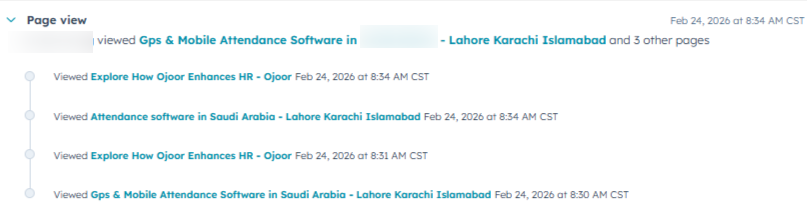
Before anyone fills a form, I already know who they are, where they came from, and what they care about. Full visitor tracking and source attribution built into HubSpot from day one.
No visibility into what contacts were doing on the website — sales had no idea which pages a lead visited, what content they engaged with, or where they came from before submitting a form.
Marketing spend had zero attribution. Teams couldn't tell which channels were driving qualified leads vs. wasted budget.
Activated HubSpot tracking across all pages with UTM parameter capture — every visit, source, medium, campaign, and content stamped automatically on contact creation.
Built a full attribution model: first touch, last touch, and multi-touch all visible on the contact timeline before the first sales call.
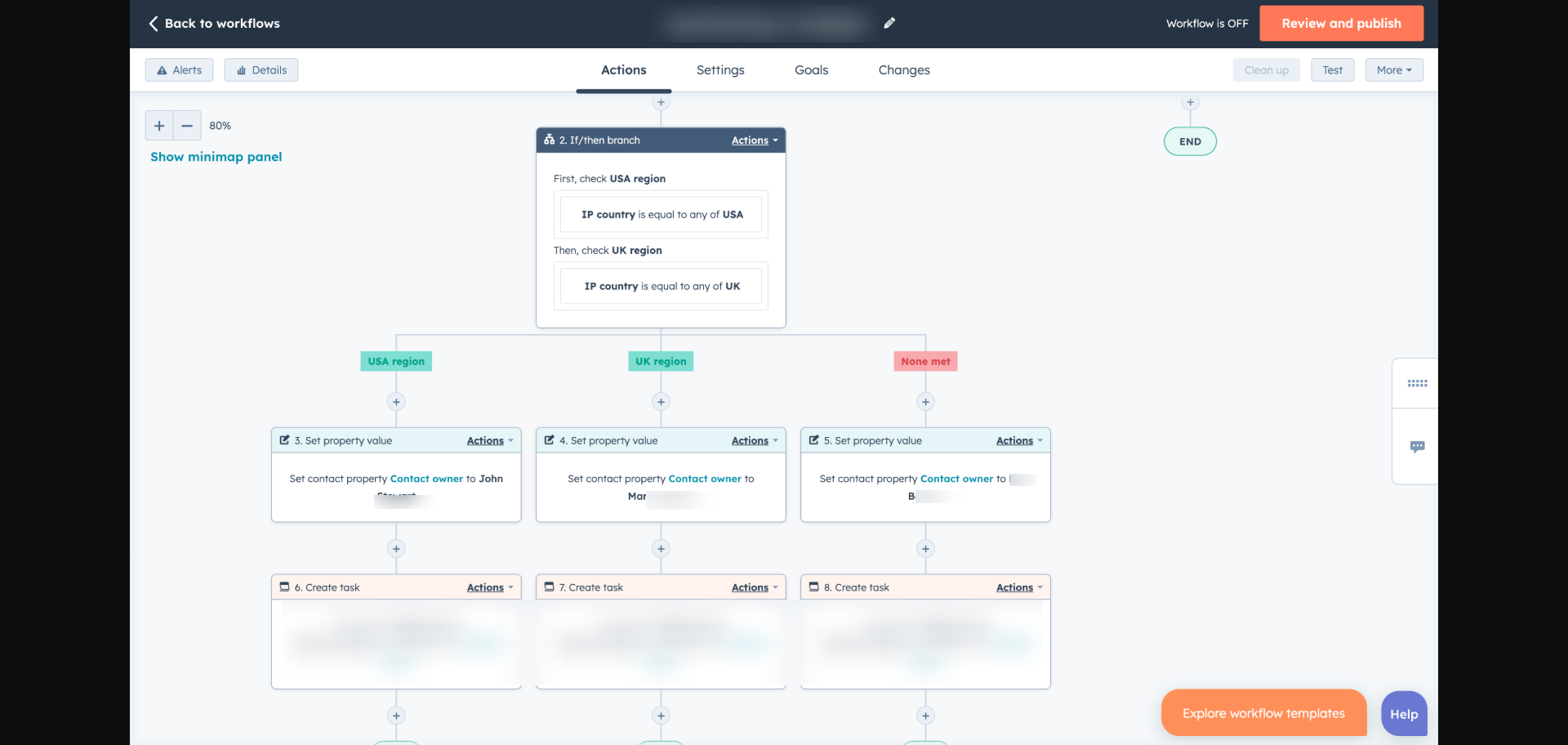
A form submits. The system reads region and language — the right rep gets a task and the SLA clock starts. Zero manual assignment.
Leads were piling up unassigned or landing with the wrong rep — wrong region, wrong language. Manual assignment took 6 to 24 hours, and by then, prospects had already lost interest.
No SLA tracking meant no accountability. High-intent leads were treated the same as cold ones.
Built an automated routing engine in HubSpot that evaluates country, city, and preferred language on every new contact — then assigns the correct rep instantly with a task and SLA clock.
Round-robin fallback for unknown regions. Arabic-language leads always route to Arabic-speaking reps regardless of geography.
Who is the ideal customer? What segment do they belong to? Is the CRM data actually clean enough to tell you? These three questions have to be answered before any routing, scoring, or reporting can work properly.
The CRM had contacts with missing industries, wrong countries, duplicate records, and no clear ownership. Leads came in without segment tags — no one knew which product tier or sales motion applied.
No agreed definition of what a good customer looked like. Sales picked leads on gut feel. Marketing ran campaigns to everyone.
Built a structured segmentation framework across five market segments mapped to industries, company size bands, and workforce type. This framework lives natively inside HubSpot — every contact and company tagged consistently.
Full CRM data validation: enriched records, deduplicated contacts, added decision-maker flags, and built an ICP scoring model that scores inbound leads before they reach a rep.
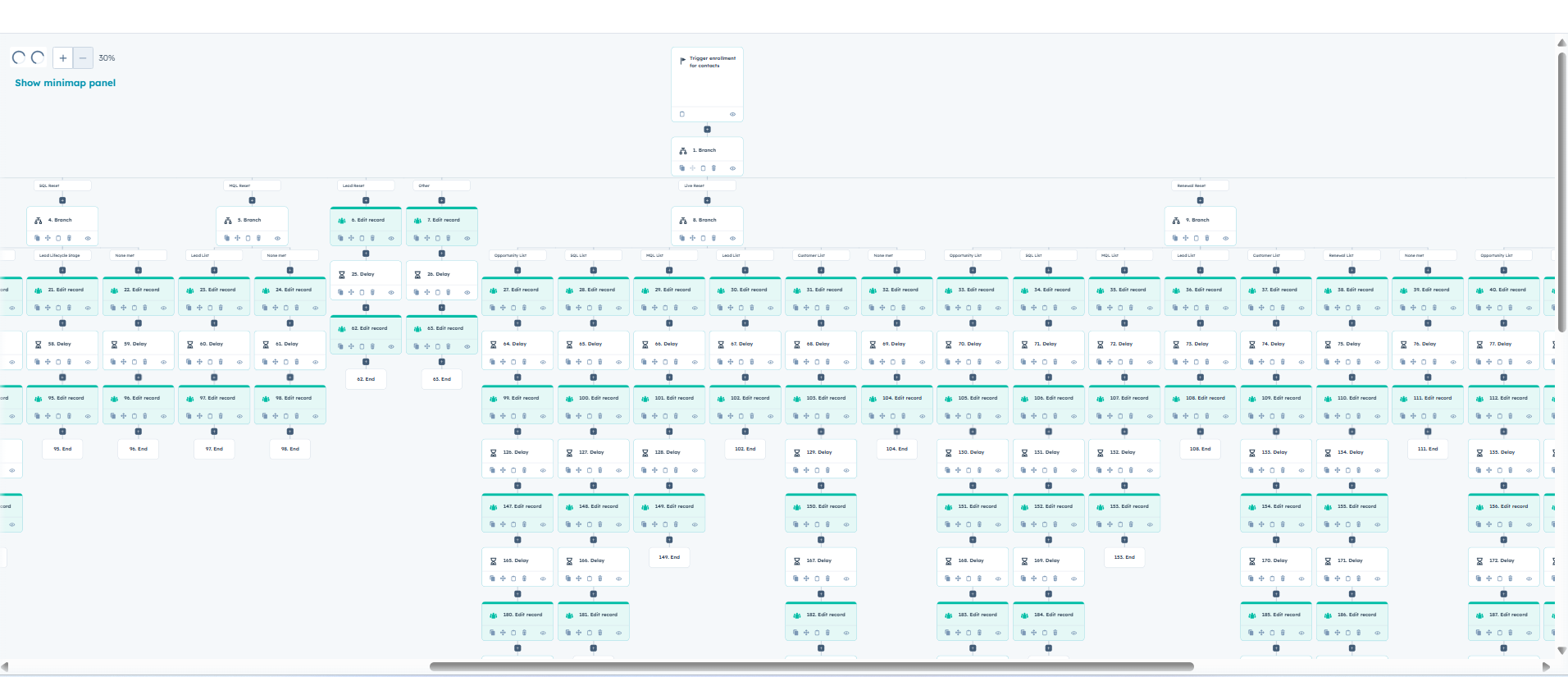
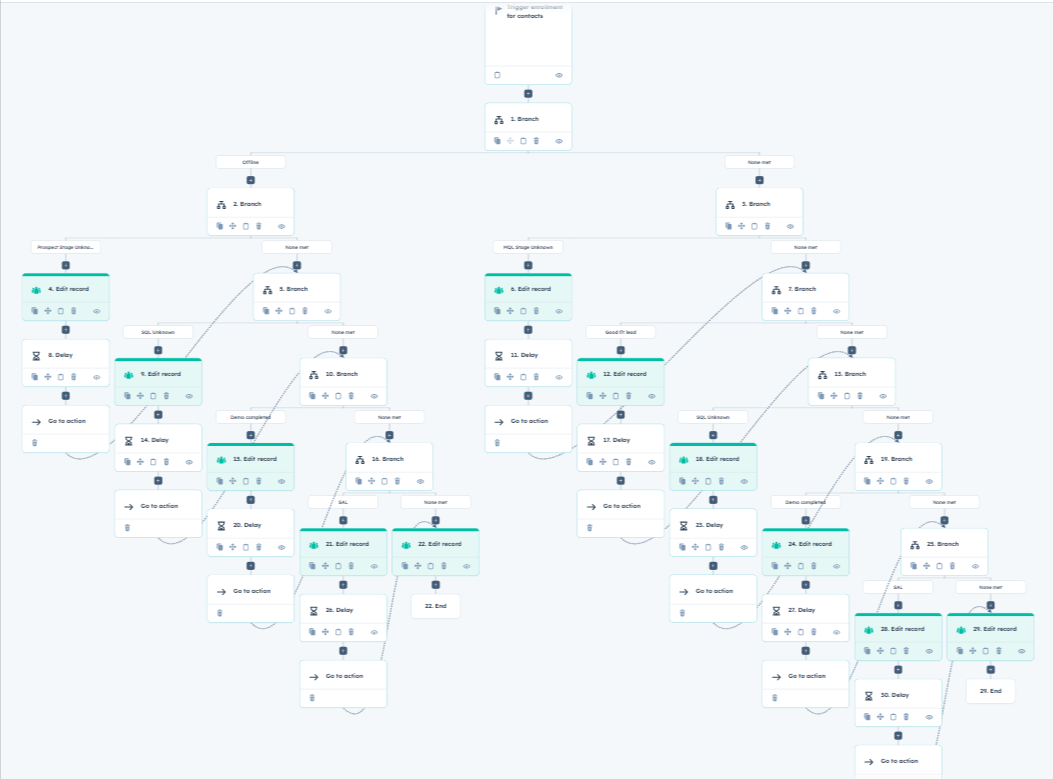
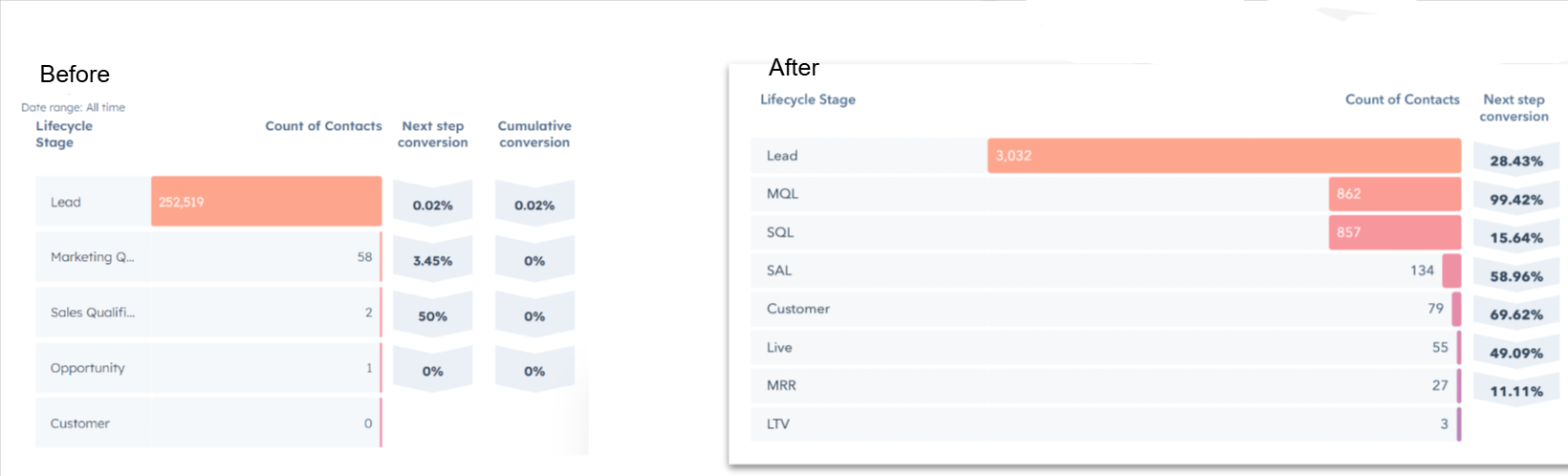
Lifecycle tracks the full relationship. Lead Stage tracks the pre-sales rep's daily working status. Both move automatically — no rep touches a dropdown.
Lifecycle stages were either missing or manually updated — meaning the data was always wrong. Sales couldn't trust the CRM. Marketing couldn't segment accurately.
No distinction between a contact's overall relationship stage and a rep's working status — everything lived in one messy field.
Built an 8-stage lifecycle framework (Subscriber → Evangelist) driven entirely by behavior triggers and deal data — zero manual updates.
Implemented HubSpot's native Lead object with 6 working stages that auto-advance based on call dispositions logged by the pre-sales team.
No-shows dropped from 35% to 12%. Every pre-meeting touch and post-meeting action runs automatically.
No-show rates were hitting 35%. Reps had no context before calls. Post-meeting follow-up was inconsistent — some reps sent it, most forgot.
Meeting booking lived outside HubSpot — no deal creation, no contact update, no visibility into whether demos were happening at all.
Built HubSpot Meetings booking links with custom intake forms for each rep. On booking: deal auto-created, contact stage updated, rep notified immediately.
Pre-meeting: T-24h reminder to prospect, T-1h SMS nudge, T-30min rep briefing. Post-meeting: outcome logged → next step auto-triggered based on result.
Stage gates keep data clean. Stale deals surface automatically. Win rate up 18% in two quarters.
Pipeline was unreliable — deals stuck in wrong stages, no required fields enforced, close dates never updated. Forecasting was guesswork.
Stale deals sat for weeks with no activity. At-risk opportunities were only spotted after they were already lost.
Architected a 7-stage B2B SaaS pipeline with mandatory entry/exit criteria. No deal advances without required properties — email, amount, close date, BANT, demo outcome, and contract upload.
Stale deal automation: flags deals after 7–14 days of inactivity → auto-task for owner → manager alert → At Risk property set for leadership dashboard.
Before a pipeline, workflow, or dashboard can be trusted, the foundation has to be solid. These five things consistently show up broken when I start with a new client.
A pipeline without a methodology is just a list of deals. The GTM playbook defines how reps qualify, how they progress, and what good looks like at every stage.
Every rep had their own version of how to sell. Qualification criteria were informal. Forecasting was unreliable because stages meant different things to different people.
Commissions were calculated manually every quarter with disputes and corrections. Reps had no visibility into their own earnings until end of period.
Built and documented a full GTM playbook inside HubSpot covering sales methodology, stage definitions, gate criteria, and SDR to AE handoff process. Every stage has a clear definition, entry requirement, and exit check.
Commission policy built into HubSpot reporting — reps see their own progress against quota in real time. Quarterly tiers and upfront bonuses calculated automatically.
A loss becomes competitive intelligence. A win activates a subscription in minutes with zero manual steps.
Lost deals had zero captured intelligence — no reason, no notes, no visible pattern. The same competitive losses happened every quarter because no one could identify why deals were being lost.
When deals were won, onboarding started days later. CS had no context. Finance wasn't notified until someone remembered. Every handoff was manual and frequently dropped.
Built a mandatory loss capture system — rep cannot mark Closed Lost until Loss Reason and Loss Notes are filled. Stage is locked until both are complete. Competitor losses auto-flag to the Product team.
Won deal automation: T+0 subscription stamped + CS assigned + welcome email. T+1 kickoff invite. T+2 finance alerted. T+3 invoice auto-generated. Zero manual steps required.
The entire billing lifecycle automated. Finance only touches what truly needs a human.
Invoices were sent manually and inconsistently. Overdue payments went unnoticed for weeks. Renewal conversations happened too late — or not at all.
MRR/ARR tracked in spreadsheets updated by hand. No early warning system for churn risk tied to unpaid invoices.
Connected HubSpot to billing — invoices auto-generated on Closed Won from deal line items. Full reminder sequence: T-7 reminder, T-1 final notice, T+3 overdue to billing, T+14 escalation to CEO/Finance.
Renewal deal auto-created 90 days before contract end. HubSpot Subscriptions tracks every active contract — MRR, ARR, and contract value live on the deal record.
From the moment a deal closes to the moment a client is fully live — every step is documented, assigned, and tracked. No dropped handoffs. No missed tasks.
Onboarding was ad hoc. Different CSMs ran it differently. Some clients got a full kickoff on day one. Others waited a week with no contact. When a CSM was sick, nothing happened for that client.
Sales closed deals and threw them over the wall. CS had no deal context, no signed contract details, and no clarity on what was sold.
Built a structured onboarding pipeline with six defined stages: Deal Closed, Welcome, Kickoff, Account Setup, Training, and Go Live. Each stage has mandatory tasks, SLA timers, and automated communications.
Sales-to-CS handover requires all mandatory deal fields filled before transition. CSM, Activation Specialist, and Account Manager assignments all happen automatically on Closed Won.
The HubSpot Customer Success Workspace gives CS teams everything they need to see every account, act on every risk, and track every renewal — without opening a spreadsheet.
Customer success was entirely reactive — CS only found out about problems when clients complained or when it was too late to save the renewal. No health score, no early warning, no expansion tracking.
NPS collected manually with a 10% response rate. Renewals created when CS remembered. CS, Sales, and Support operated in complete silos.
Built a full CS ops layer: 8-stage CS pipeline, 5-signal health scoring engine (NPS + usage + tickets + invoices + onboarding) updated weekly by Operations Hub. Automated NPS at Day 60, escalation paths for critical accounts, renewal auto-creation at T-90.
Connected Sales, CS, and Support into one system. The CS Workspace is the control center — every account health, renewal, flag, and task visible in one view.
| Signal | Weight | 🟢 Healthy | 🟡 At Risk | 🔴 Critical |
|---|---|---|---|---|
| NPS Score | 30% | 8–10 | 6–7 | Below 6 |
| Product Usage | 25% | Last 7 days | 8–20 days | 21+ days |
| Support Tickets | 20% | 0–1 open | 2–3 open | 4+ |
| Invoice Status | 15% | Paid on time | 1–14 days late | 15+ days |
| Onboarding | 10% | 100% | 50–99% | Below 50% |
Every support request logged, routed, prioritized, and tracked inside HubSpot Service Hub. No ticket falls through the cracks. No SLA gets missed silently.
Support requests came in from email, WhatsApp, and phone with no central place to track them. Reps picked tickets informally. SLAs were verbal agreements nobody tracked.
When a client escalated, the CS team had no ticket history to reference. Every handoff was a conversation from memory.
Configured HubSpot Service Hub as the central ticketing layer. Every incoming request converted to a ticket automatically with category, priority, and owner assigned by pipeline rules. SLA timers start the moment a ticket is created.
Ticket pipelines built per function: technical support, billing queries, onboarding blockers, and escalations all have their own stages, owners, and SLA thresholds.
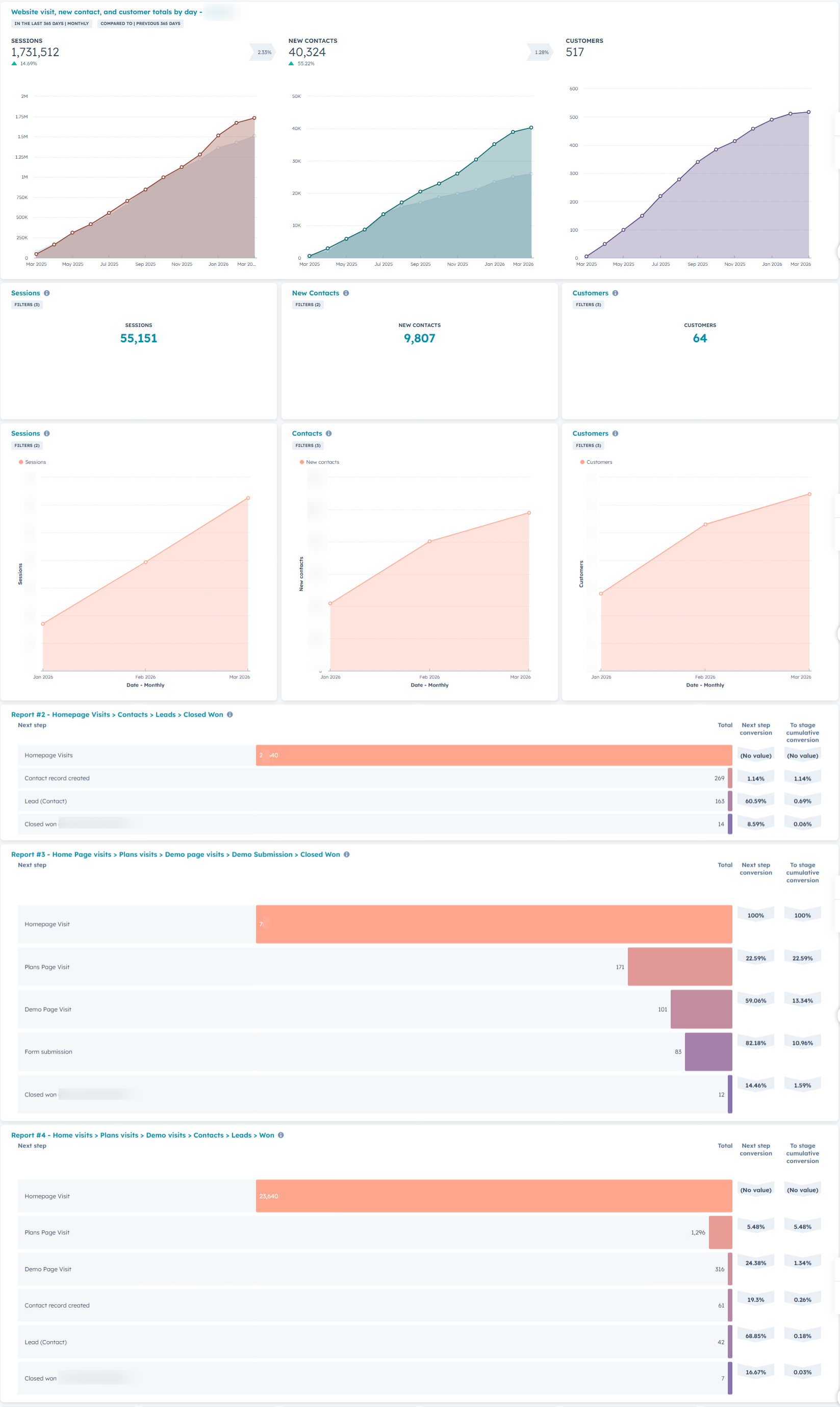
Every system I build gets a dashboard. HubSpot reporting, Tableau visualizations, and custom views that give leadership the numbers they need — without asking anyone to pull a report.
Leadership asked the same questions every week: "How's the pipeline? Where are we on quota? What's the NPS trend?" Every answer required someone to manually pull data from three different places.
Reports were stale by the time they landed. Sales, Marketing, and CS all had different numbers for the same metric — trust in data was at zero.
Built a layered reporting architecture: HubSpot native dashboards for ops-level visibility (pipeline health, rep performance, lifecycle conversion), and Tableau for executive-level data storytelling across multiple data sources.
Every section of this portfolio has a corresponding dashboard — tracking, lifecycle, pipeline, CS health, billing, support. One source of truth, always live.
Real feedback from real engagements — HubSpot implementations, CRM migrations, and revenue operations builds across EMEA and USA.
Available for RevOps roles, HubSpot consulting, and GTM system builds. On site or remote. Let's talk about what's broken and how to fix it.